NEC M362X Manual do Utilizador Página 31
- Página / 165
- Índice
- RESOLUÇÃO DE PROBLEMAS
- MARCADORES

- M402W/M362W/M322W/ 1
- M402X/M362X/M322X/M282X/ 1
- M352WS/M302WS/M332XS/ 1
- Important Information 3
- Important Safeguards 4
- Installation 4
- Fire and Shock Precautions 5
- Power management function 8
- Table of Contents 9
- 1. Introduction 12
- Features you’ll enjoy: 13
- About this user’s manual 14
- ❸ Part Names of the Projector 16
- Front/Top 18
- Top Features 19
- Terminals Features 20
- Remote Control Precautions 22
- Battery Installation 22
- Download service 23
- Operating Environment 24
- [Windows] 24
- ❶ Flow of Projecting an Image 26
- ❸ Turning on the Projector 28
- ❹ Selecting a Source 30
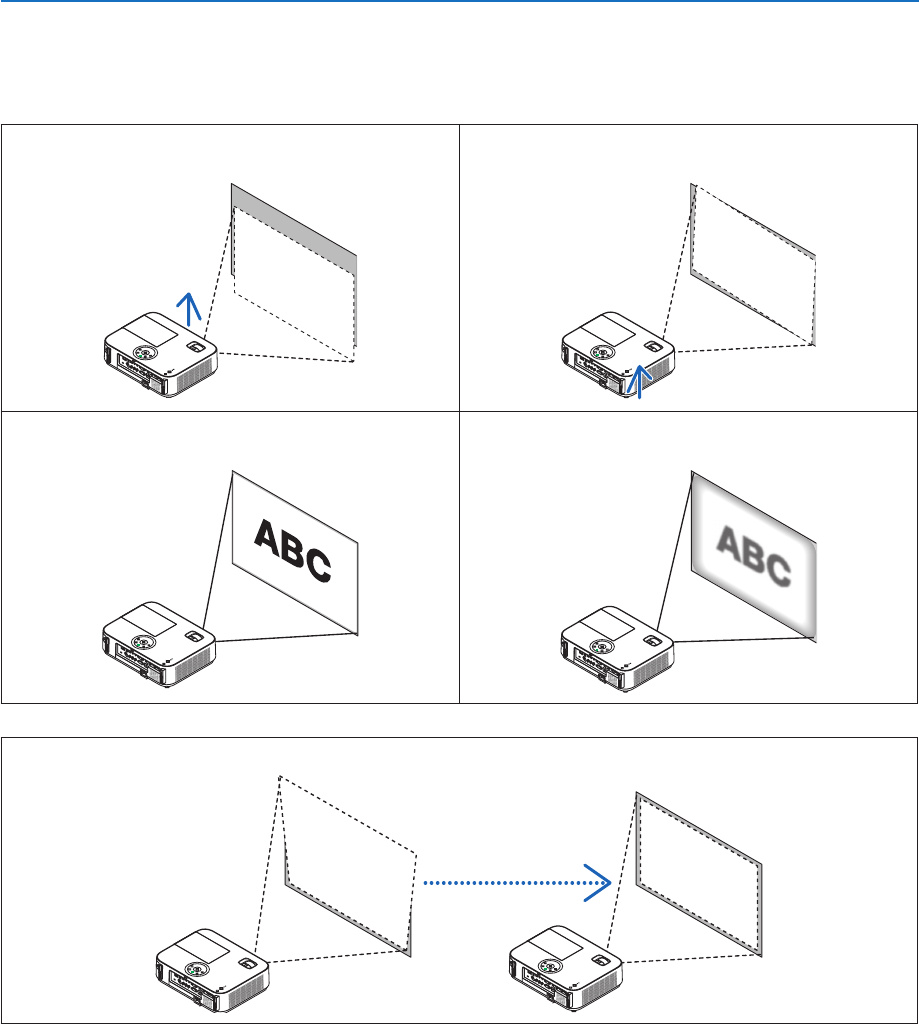
- Adjust the Tilt Foot 32
- [M332XS/M352WS/M302WS] 33
- M322W/M402H] 34
- [M352WS/M302WS/M332XS] 35
- Projected area 37
- Screen frame 37
- Align left side 37
- ❽ Turning Up or Down Volume 39
- ❾ Turning off the Projector 40
- ❿ After Use 41
- 3. Convenient Features 42
- Using Eco Mode [ECO MODE] 44
- Start using the shortcut icon 53
- Start from the Start menu 53
- ExitingVirtualRemoteTool 54
- Function) 55
- Overview 58
- Preparation before Use 58
- PROJECTOR ADJUSTMENT 59
- NETWORK SETTINGS 61
- •SETTINGS 61
- •ALERTMAIL 63
- •NETWORKSERVICE 63
- •INFORMATION 64
- Using on Windows 65
- Supported OS: 73
- Using on Mac OS 74
- What you can do with GCT 76
- ⓭ Viewing 3D Images 78
- ⓮ Connecting Your Microphone 82
- 4. Using the Viewer 83
- Starting the Viewer 85
- Exiting the Viewer 87
- Parts of each screen 88
- Using the toolbar 89
- Thumbnailtoolbar 89
- Slidetoolbar 90
- Slideshowtoolbar 90
- Menu Elements 92
- ❸ List of Menu Items 93
- [PICTURE] 97
- [PRESET] 97
- [DETAIL SETTINGS] 97
- 5. Using On-Screen Menu 100
- [IMAGE OPTIONS] 100
- M352WS/M302WS/M402H) 104
- ECO MODE 106
- AUTO ECO OPTIONS 106
- NORMAL OPTION 106
- ECO OPTION 107
- [3D CAUTION MESSAGE] 109
- [INSTALLATION] 110
- EnablingSecurity[SECURITY] 110
- [OPTIONS(2)] 114
- [GLASSES] 117
- [FORMAT] 117
- [L/RINVERT] 118
- Important 119
- [USAGE TIME] 122
- [SOURCE(1)] 123
- [SOURCE(2)] 123
- [WIRED LAN] 123
- [WIRELESS LAN] 124
- [VERSION(1)] 124
- [VERSION(2)] 124
- [OTHERS] 125
- Selecting a Location 127
- 150" 128
- 120" 128
- 100" 128
- 80" 128
- 60" 128
- Distance Chart 130
- Reflecting the Image 131
- ❷ Making Connections 132
- MONITOR OUT(COMP.) 134
- AUDIO OUT 134
- AUDIO IN 134
- COMPUTER IN 134
- VIDEO IN 135
- Connecting Component Input 136
- Connecting HDMI Input 137
- Connecting to a Wired LAN 138
- Example of LAN connection 138
- Important: 139
- Flow of Setting Wireless LAN 139
- 7. Maintenance 142
- ❸ Replacing the Lamp 143
- CAUTION: 144
- To replace the lamp: 144
- Power Indicator 146
- Status Indicator 146
- Lamp Indicator 146
- 8. Appendix 147
- ❷ Specifications 149
- Mechanical 150
- Electrical 151
- ❸ Cabinet Dimensions 155
- Attachingthecablecover 157
- Removingthecablecover 157
- Mini D-Sub 15 Pin Connector 158
- PC Control Codes 160
- Cable Connection 160
- ❼ Troubleshooting Check List 161
- ❽ TCO Certification 163
- States, Canada, and Mexico) 164
Manuais e produtos relacionados com Projetores de dados NEC M362X
 (9 páginas)
(64 páginas)
(62 páginas)
(9 páginas)
(64 páginas)
(62 páginas)

 (2 páginas) (221 páginas)
(92 páginas)
(58 páginas)
(149 páginas)
(114 páginas)
(151 páginas)
(117 páginas)
(75 páginas)
(53 páginas)
(183 páginas)
(2 páginas) (221 páginas)
(92 páginas)
(58 páginas)
(149 páginas)
(114 páginas)
(151 páginas)
(117 páginas)
(75 páginas)
(53 páginas)
(183 páginas)
© 2020, manymanuals-pt.com. Todos os direitos reservados. | 0.059 s |
 Manymanuals.com
 Manymanuals.de
 Manymanuals.fr
 Manymanuals.it
 Manymanuals.pl
 Manymanuals.cz
 Manymanuals.es
 Manymanuals-pt.com
Comentários a estes Manuais